0→1 and evolving product UX
A multi-year enterprise product effort spanning discovery, core workflows, component-level design, AI exploration, and scale.
Designing Microsoft Defender Advanced Hunting as a guided, AI-assisted investigation workspace — so SOC analysts can start from a question and progressively reach expert-grade KQL, without losing depth, explainability, or trust.
This is classical product design in a complex, high-stakes domain: I connected customer evidence, product strategy, interaction design, system quality, and engineering mobilization to make expert security workflows more approachable.
A multi-year enterprise product effort spanning discovery, core workflows, component-level design, AI exploration, and scale.
I combined customer feedback, usability research, competitive analysis, and an on-site SOC visit before setting and prioritizing UX requirements with PM.
I can prototype quickly, resolve deep component behavior, contribute patterns back to the design system, and recruit the partners needed to ship.
Process: Customer feedback & usability research → competitive analysis → site visit → PM/UX requirements and prioritization → rapid prototyping → component deep design → design-system contribution → AI exploration → customer value and impact. I also brought together a 10-engineer team from multiple pillar teams to contribute.
The challenge. Advanced Hunting is powerful, but KQL can be difficult to learn. Analysts often know what they want to investigate — but not which data to use, or how to write the query.
The contribution. This work spanned experiences such as Guided Hunting, Query Builder, Query Assistant, integrated filters, and reusable query workflows — helping analysts start from their investigation goal and arrive at the right query faster, with less reliance on KQL expertise.
The unifying idea across the whole design: let analysts start from intent, context, or guided structure — then progressively move toward expert KQL control. Each layer stands on its own, and hands off cleanly to the next.
The through-line. A single investigation flows down the connected wire from natural-language intent at the top to expert KQL and scale below — the same hunt, expressed at whatever level of expertise an analyst is comfortable with.
Advanced Hunting let analysts investigate threats across large-scale security data with KQL. But to use it, they had to understand schema, write KQL, manage query state, interpret results, avoid throttling, and pivot between alerts, incidents, Guided Hunting, and Advanced Hunting.
A 2022 design review captured the pain directly: KQL was “a big barrier,” less-experienced operators were “intimidated and discouraged,” and people were “afraid to even try.” The goal was never to remove KQL power — it was to make that power reachable.
How might we preserve the depth of Advanced Hunting while making it easier for analysts to start, explore, and scale their investigations?
The work was framed as a single continuum. The same surface should meet a nervous first-timer and a veteran threat hunter — guiding one without slowing the other. Nothing is hidden; the analyst simply chooses how much structure they want.
Start from filters, sample queries, and context — no syntax required.
Compose conditions with AND/OR and grouping; watch the KQL take shape.
Full expert control — tabs, schema, and custom detections.
One experience spans the whole expertise spectrum — from guided starts to raw KQL — instead of forking into separate “easy” and “advanced” products.
A field visit to a SOC team in Hyderabad — alongside a PM partner — put the work in front of analysts using Defender, Threat Explorer, and Guided Hunting under real pressure. Questions gathered from design and product stakeholders beforehand made it double as broader research — where hunts start, what triggers the move from an alert into hunting, and where guidance breaks down at scale.
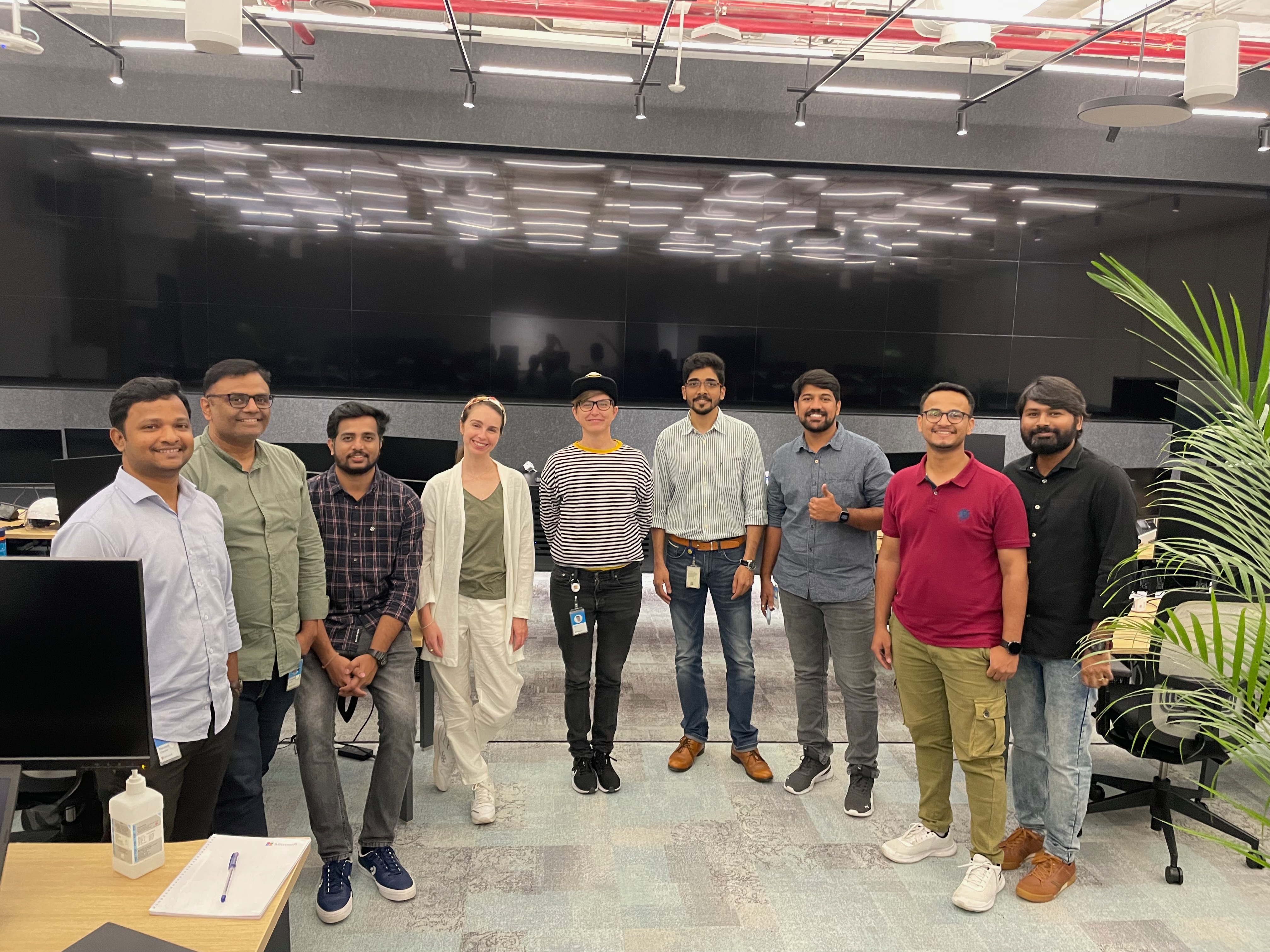
The signal was consistent: Advanced Hunting was valuable but under-guided. That validated investing in structure, workspace maturity, and operational visibility — not dumbing it down.
Collecting the grouping-condition requirements for Guided Hunting meant working with PM and engineering to close the technical spec. The hard part was interaction, not visuals: how do you let an analyst combine conditions with AND / OR and grouping without making them think like a programmer — while the UI silently generates valid KQL underneath?
Query Builder logic. Three conditions combine with AND / OR inside a group, and that structure resolves into the exact KQL it generates — the bridge from analyst intent to expert syntax.
Because the design was “very technical,” keeping UX quality in scope took constant pushing — documenting accessibility and overflow behavior, and running the grouping model through cross-disciplinary review with product and engineering.
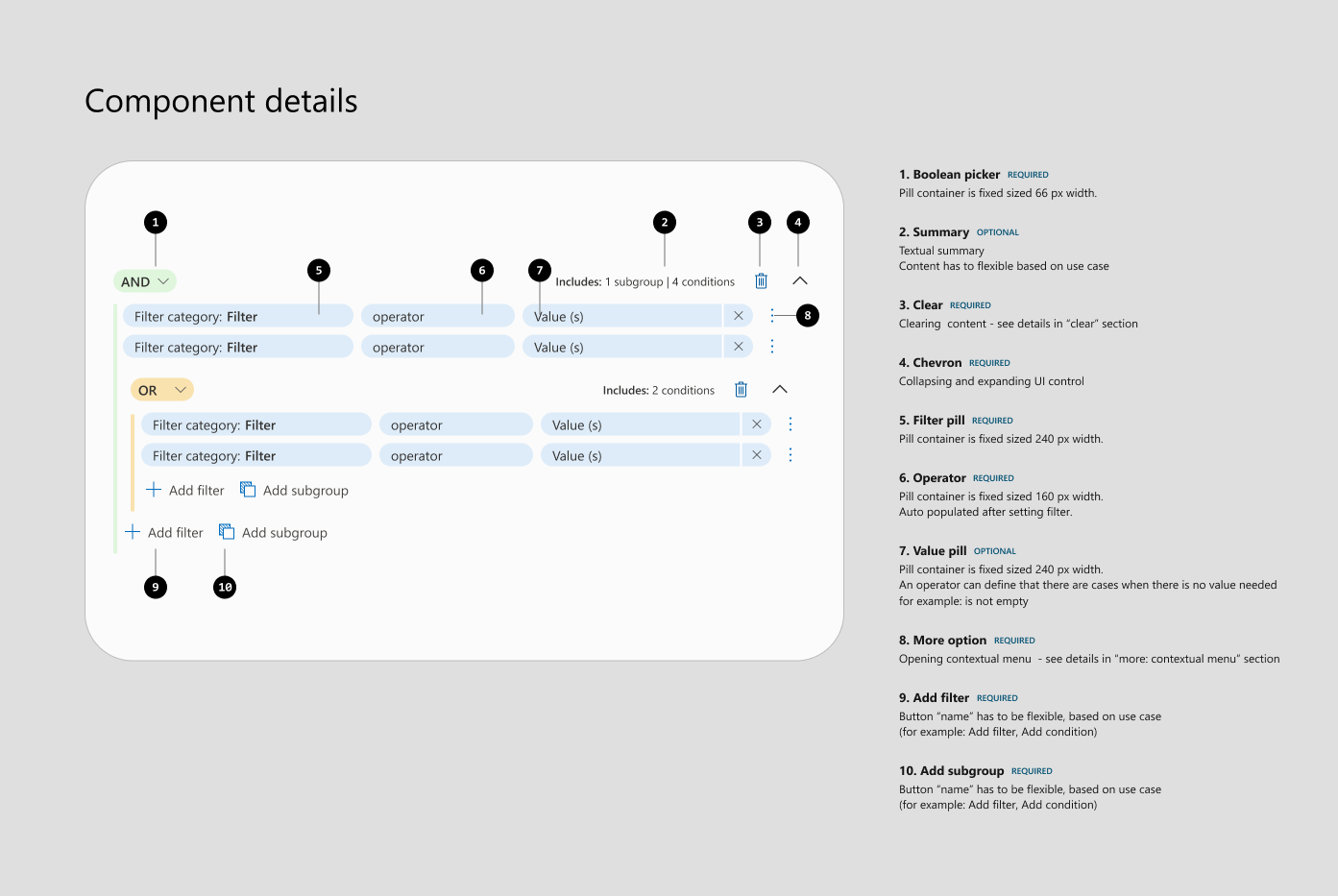
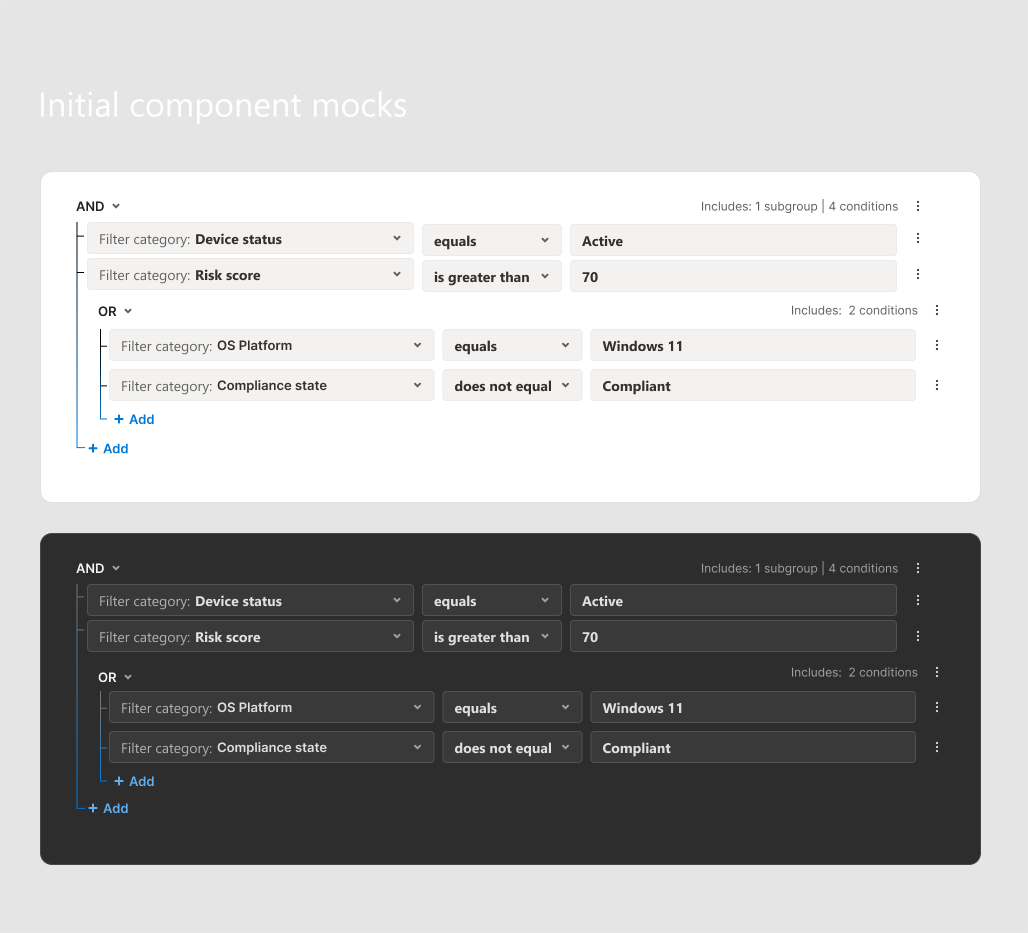
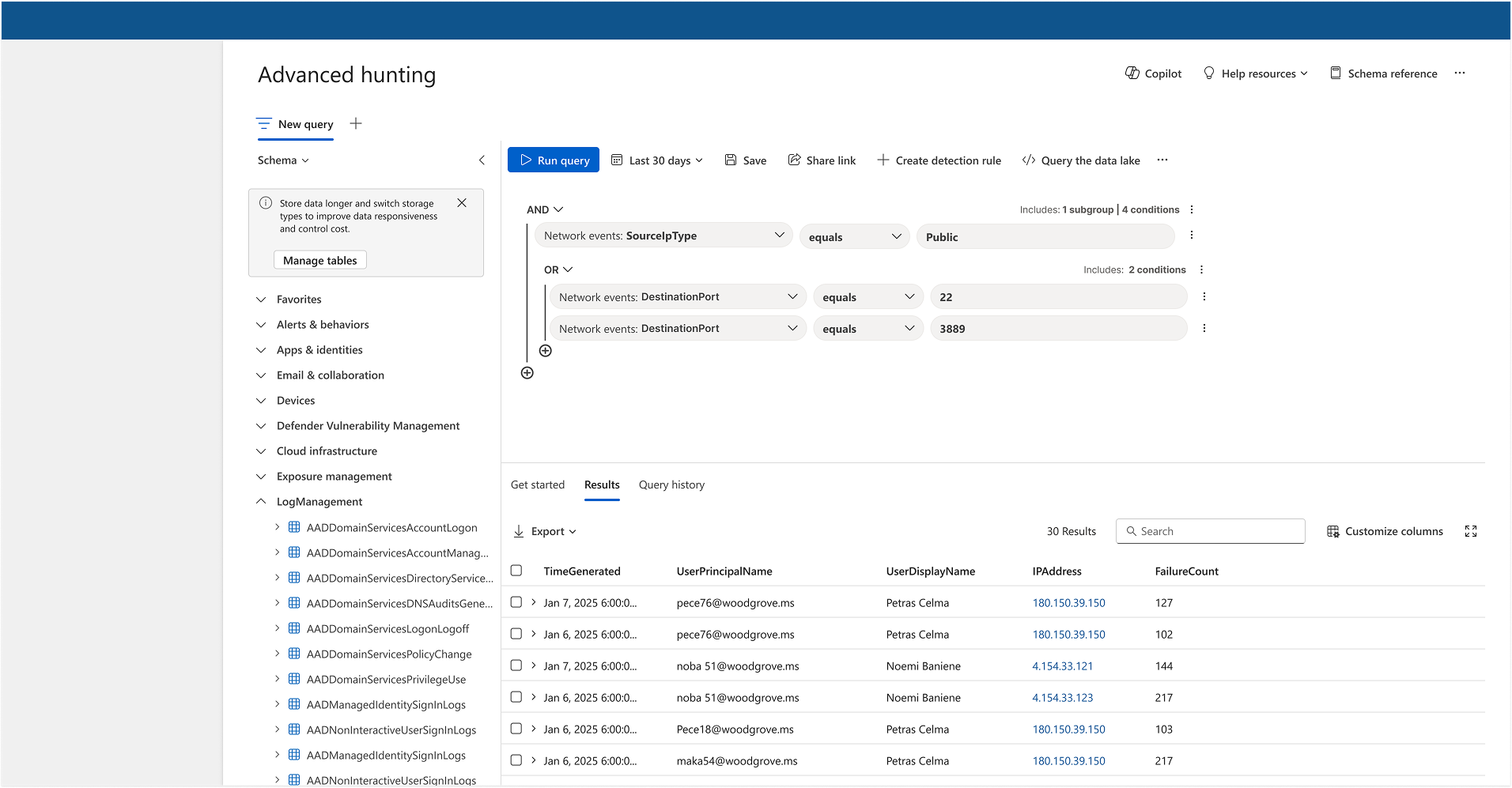
The Guided Hunting integrated filters let analysts narrow an investigation with structured inputs instead of a blank KQL editor. In August 2022 the feature was completed and merged to staging.
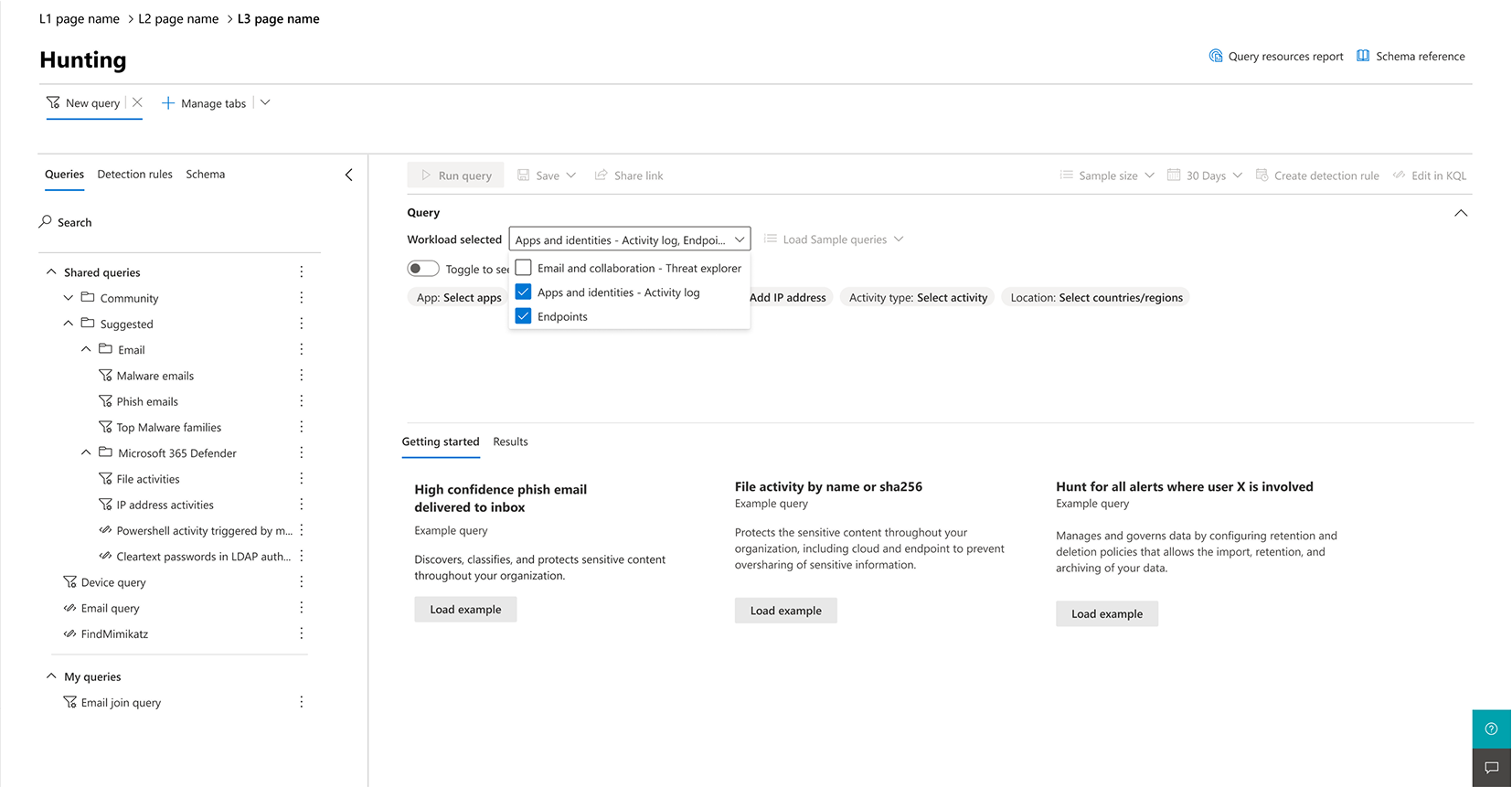
Initial designThe first concept — workload-scoped filters (apps, identities, endpoints) placed directly above the query, so analysts choose a scope before touching KQL.
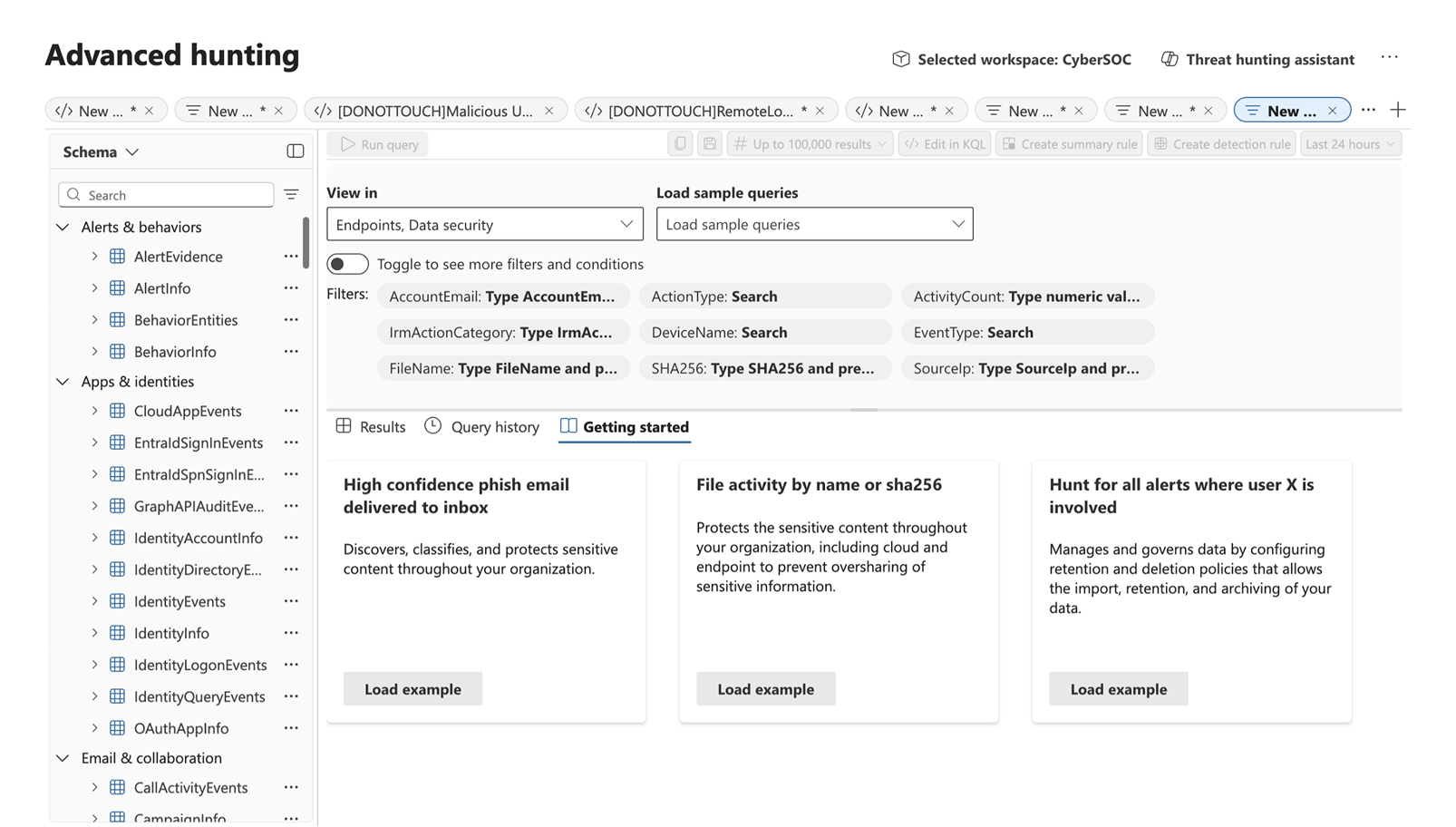
ImplementationWhat shipped — integrated filters built into Advanced Hunting: schema-aware pills (AccountEmail, ActionType, DeviceName, SHA256…) and a toggle for more filters and conditions.
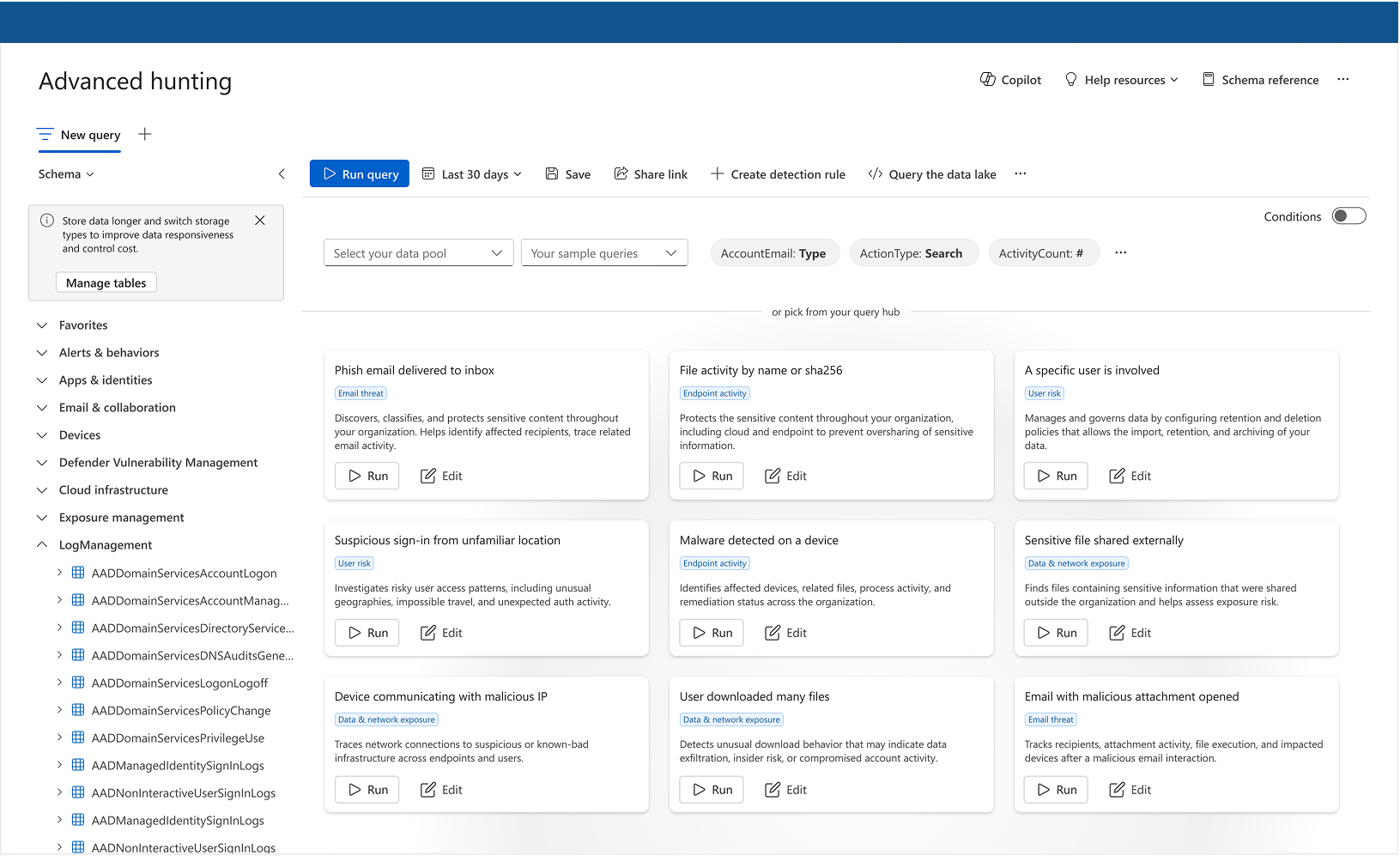
Future planWhere it's heading — an intent-led query hub with Copilot and data-lake support, folding filters and conditions into guided, ready-to-run starting points.
Analysts rarely begin from an empty editor; they start from an alert, an incident, or a suspicious entity. This work covered the Hunting-side UX of a cross-surface Go Hunt effort (partner designers owned the incidents/alerts side), shaping how investigation context flows straight into a hunt.
Go Hunt. An alert, incident, or entity carries its context straight into the Advanced Hunting workspace — so proactive search begins where the evidence already is, without context-switching.
Hunting is nonlinear — analysts branch into hypotheses, compare paths, and return to earlier work. This work explored workspace behaviors like query tabs, saved guided queries, and templates, especially where multi-tenant and guided/advanced modes intersect, reframing a single-query editor as a multi-thread investigation space.
A multi-thread workspace. One root query branches into parallel hypotheses held in separate tabs — letting analysts chase several leads at once without losing their place, the way real hunting unfolds.
The Advanced Hunting navigation tree was designed and documented here: browsing and discovering schema, organizing categories, expanding system tables and custom logs, searching, and source controls. When the implementation later moved to the Fluent Tree component, those core capabilities carried over.
Schema navigation. Categories expand to reveal the underlying tables, so analysts can see the available data landscape before writing a query — discoverability replacing memory and external docs.
As hunting scaled, customers needed to see which queries were expensive and how to avoid throttling. The Query Resources Report — designed here — launched to Ring 2 in November 2022 and GA in February 2023, giving visibility into CPU consumed over the last 30 days, the most resource-intensive queries, and excessive-usage patterns.
Query Resources Report. Thirty days of query cost, with an over-budget query flagged above the throttle limit — letting customers self-diagnose expensive hunts and prevent throttling.
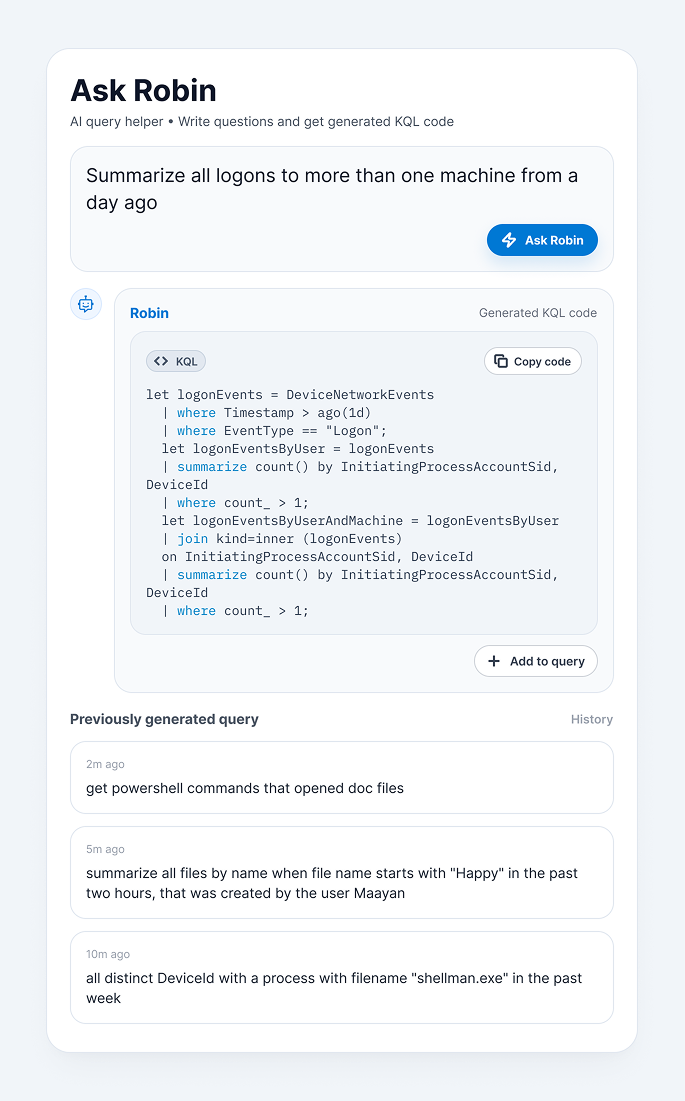
This work contributed to early natural-language-to-KQL and Query Assistant UX as part of a cross-functional team. The timing is what makes this significant: AskRobin won its Hackathon and was presented to Thomas Dohmke, CEO of GitHub, in May 2022 — roughly six months before ChatGPT launched and kicked off the generative-AI wave. The concept — ask a question in plain English, get an expert KQL query — reframed hunting from syntax-first to intent-first while natural-language security investigation was still an unproven idea, not an obvious feature. The team was designing the Copilot-style, intent-first workflow years before that pattern became the industry default.
AskRobin. A plain-language question resolves into a KQL query while keeping the generated syntax visible — anticipating Copilot-style security workflows a full generation of AI ahead of the curve, while letting analysts learn and stay in control.
Advanced Hunting became part of Microsoft 365 Defender multi-tenant management, with UX ownership of the hunting experience on this side. The 2023 public preview described a single pane of glass for threat hunting across workloads and tenants.
Multi-tenant hunting. Scattered tenants converge into one aligned view — scaling from a single analyst's productivity to organizations hunting across many tenants from a single pane of glass.
Advanced Hunting is a technical product where UX decisions directly change system behavior, so the work stayed close to PM and engineering throughout — defining V1 boundaries, translating analyst needs into technical requirements, aligning on Boolean and grouping logic, understanding KQL-generation constraints, documenting the schema tree, and moving the Query Resources Report from Figma to launch.
| Area | Impact |
|---|---|
| Accessibility of power | Lowered the barrier for analysts who weren't KQL experts. |
| Expert productivity | Tabs, templates, schema discovery, and raw-KQL paths for veterans. |
| Shipped / staged | Guided Hunting integrated filters reached staging. |
| GA launch | Query Resources Report shipped to GA (Feb 2023). |
| AI innovation | AskRobin / Query Assistant anticipated Copilot-style workflows ~6 months before ChatGPT. |
| Executive visibility | Natural-Language KQL presented to GitHub CEO Thomas Dohmke. |
| Enterprise scale | Extended into multi-tenant Advanced Hunting. |
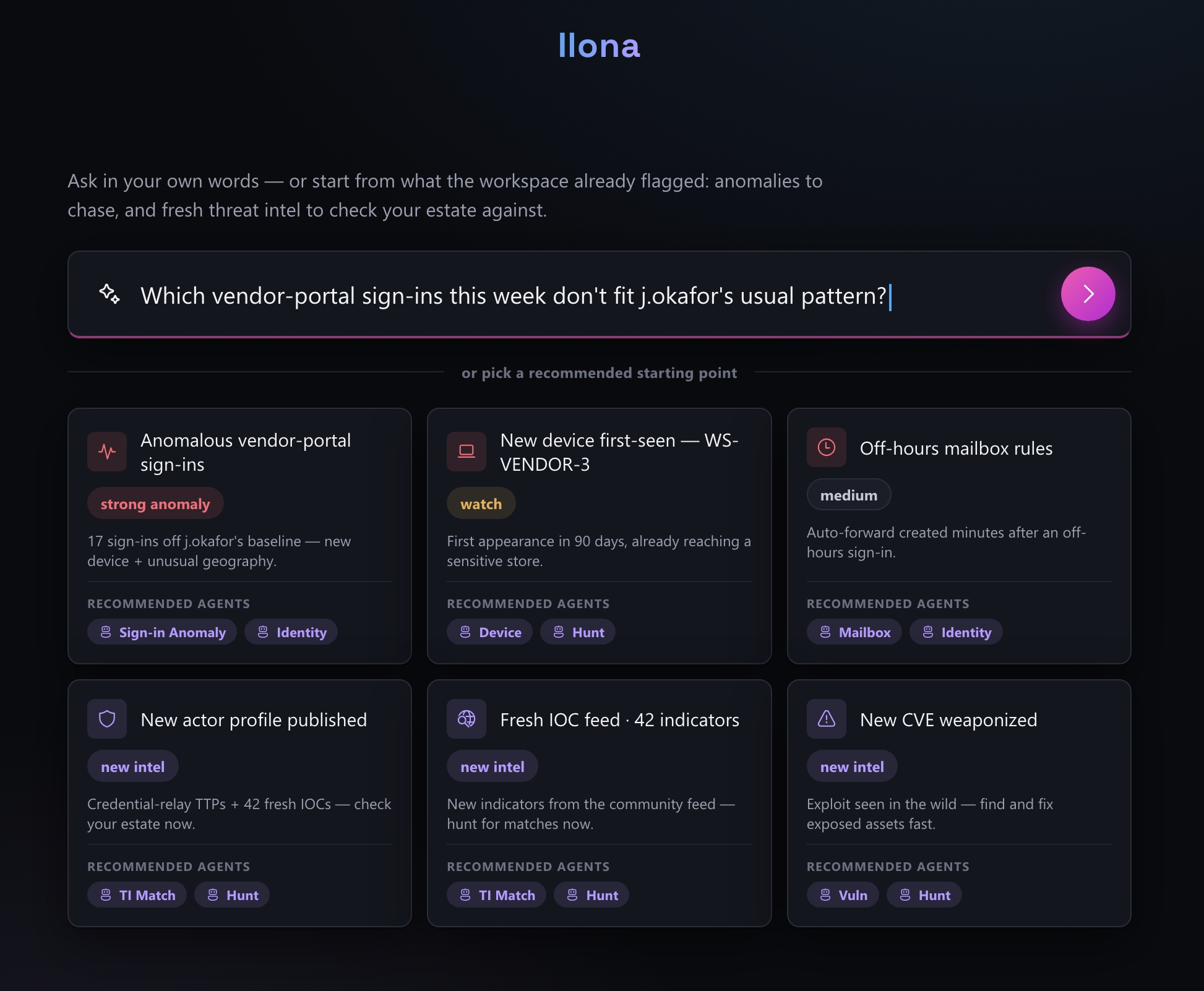
Beyond what shipped, the thinking kept pushing on where hunting goes next: an agentic, intent-first workspace where an analyst asks in plain language, pivots on a live attack graph or adjustable KQL, and turns a single confirmed case into an estate-wide fix in one move. Ilona is an interactive north-star prototype that makes that vision tangible — start from a recommended anomaly or fresh threat intel, work a case end to end, then scale and remediate.
A bridge from analyst intent to expert KQL — helping Microsoft Defender Advanced Hunting become a guided, AI-assisted, enterprise-ready investigation workspace.