Platform and design-system transformation
A multi-team adoption program serving four Microsoft Security portal pillars and a design community of 190 designers.
How product-specific UX needs became a scalable design-system operating model across four Microsoft Security portal pillars — a security-focused layer on Microsoft Fluent that grew from components and page templates into security, Copilot, and AI pattern collections and frameworks: flexible enough to compose whole applications, and now part of the AI chat canvas itself.
SFE shows a different dimension of my work: creating the standards, contribution paths, and cross-functional operating model that help many teams ship coherent product experiences, not just designing one surface myself.
A multi-team adoption program serving four Microsoft Security portal pillars and a design community of 190 designers.
I translated recurring product needs into reusable patterns, then built clearance, migration, contribution, accessibility, and support practices around them.
I align designers, product teams, and platform and infrastructure engineering so quality can scale beyond any one team or release.
Process: Identify repeated UX gaps → align product and platform requirements → define reusable components and page patterns → establish governance and contribution workflows → enable migration and accessibility → support adoption across 190 designers → evolve the system toward Copilot and AI surfaces.
Across a complex security product surface, teams were solving similar UX problems in different ways. Multiple design systems and component libraries caused confusion and inconsistent portal experiences; migration work surfaced inconsistent quality, design-engineering misalignment, and UX gaps caught late.
How might we give many product teams one coherent, security-focused system to build on — without slowing any of them down?
The goal wasn't a bigger component library; it was an operating model spanning four Microsoft Security portal pillars — a shared system plus the workflows, handoffs, and rhythms that make adoption the path of least resistance.
Four portal pillars, one system. Across four MSEC portal pillars, scattered libraries and one-offs converge onto a single security-focused system built on Fluent — the same UX problems, solved once and reused everywhere.
List pages are core to security workflows: analysts and admins use them to triage alerts, review entities, manage assets, inspect recommendations, and move into investigation flows. Across MSEC portals the same surface — dense lists, filters, tables, actions, status, and investigation entry points — was being rebuilt differently every time.
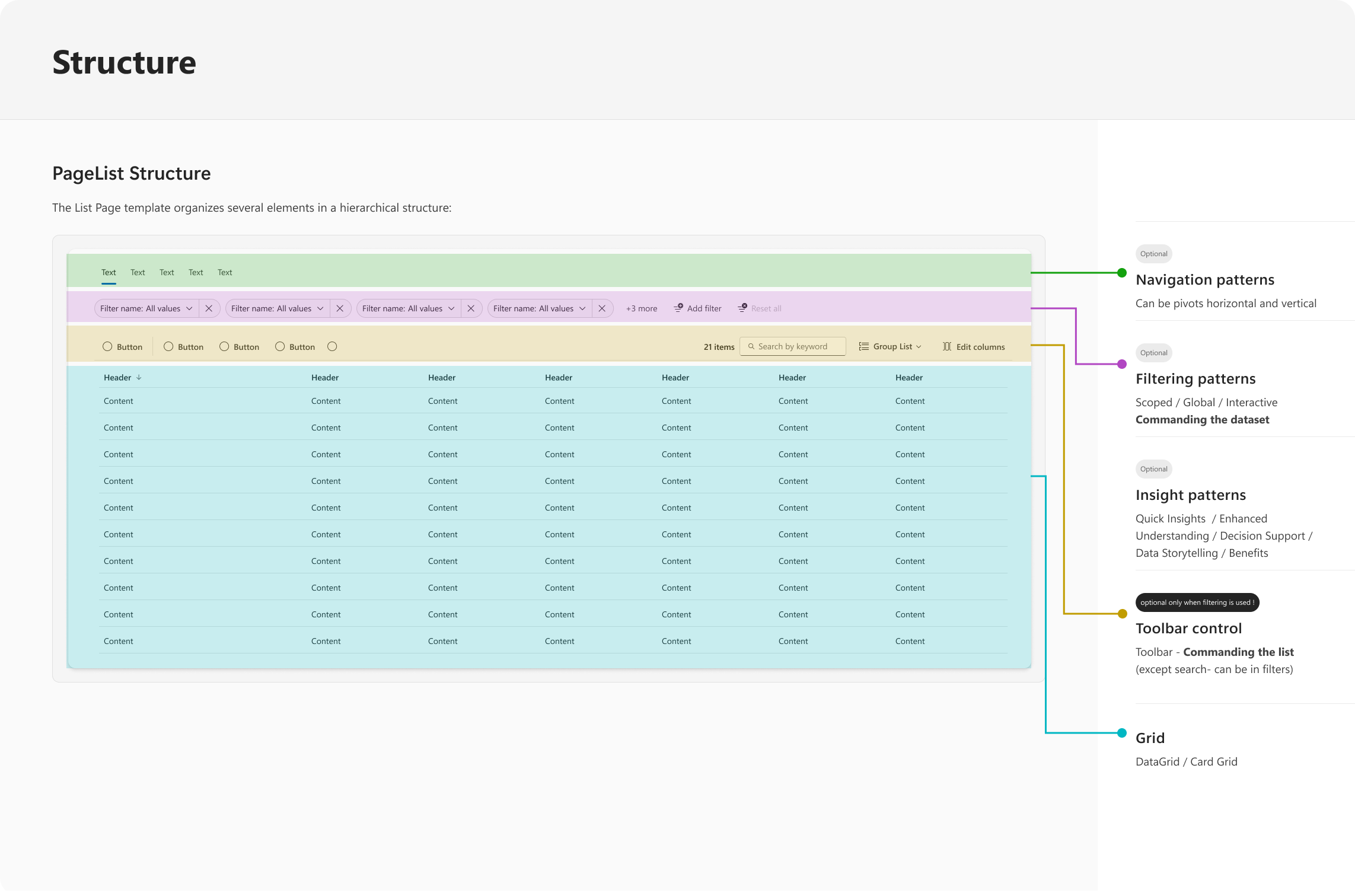
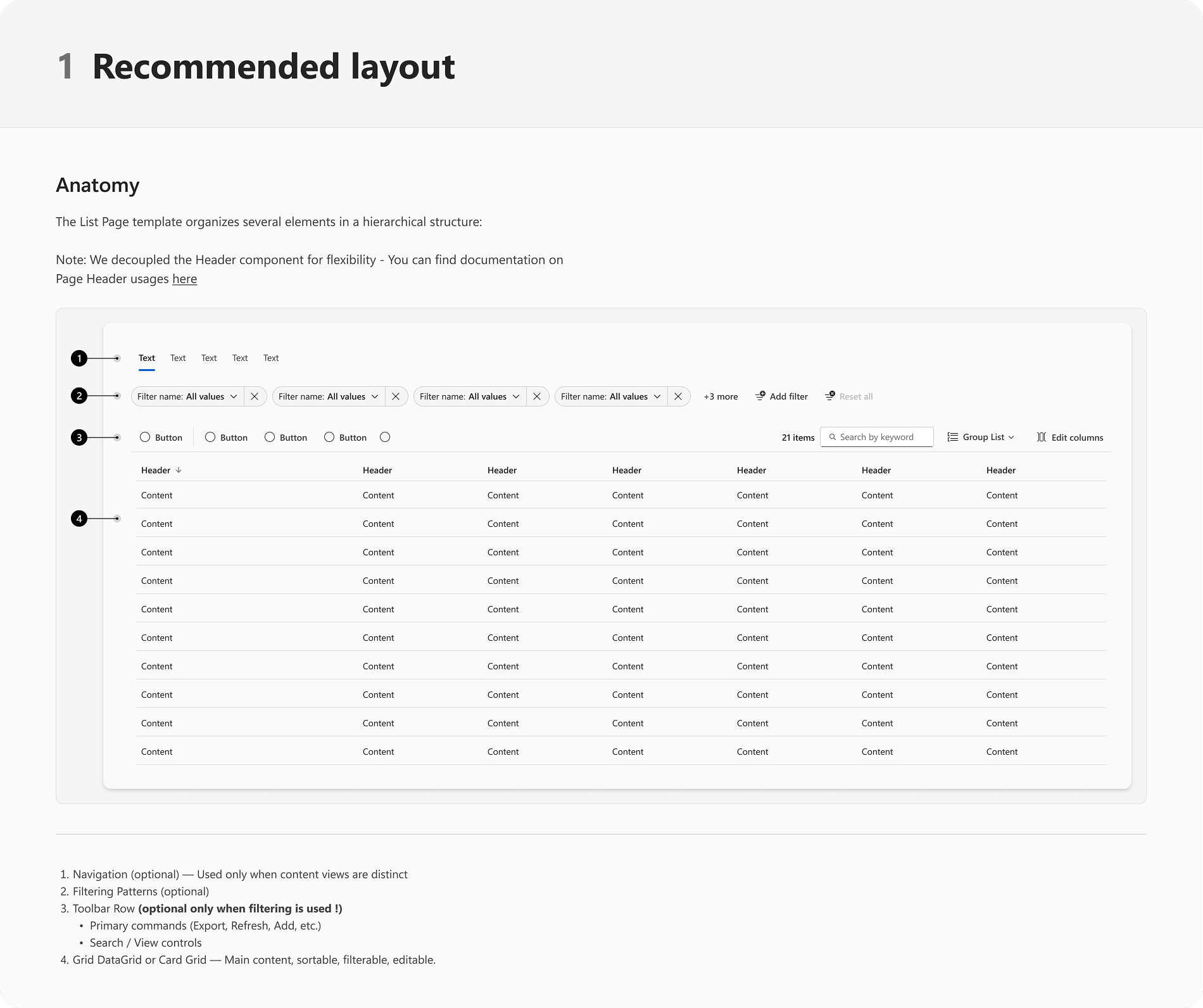
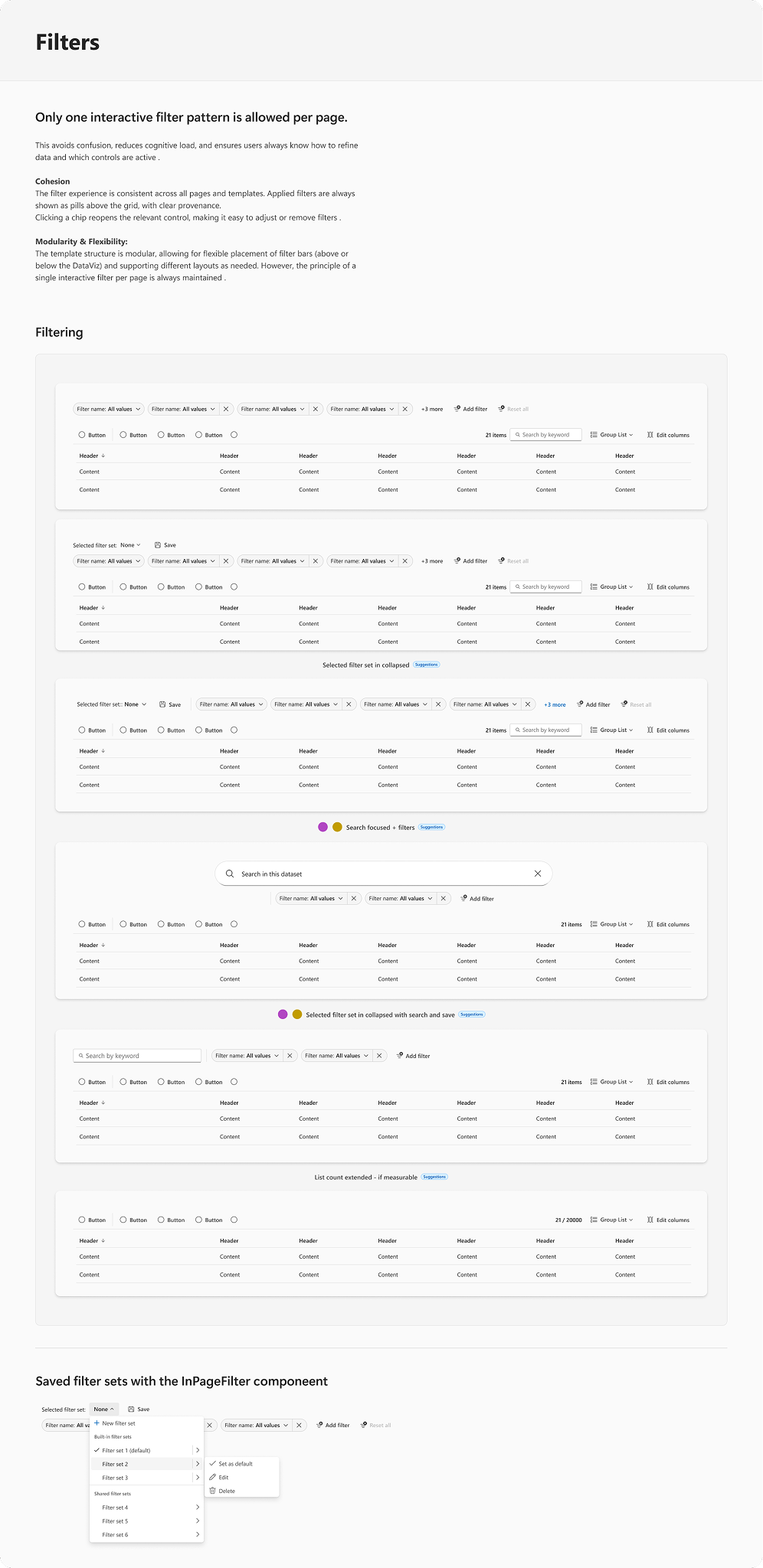
The Listpage work turned a repeated, inconsistent pattern into a coherent, SFE-backed page standard across Microsoft Security portals — defining how list pages should behave, not just how they look: page structure, command areas, filtering, search, selection, bulk actions, empty / loading / error states, details panels, responsiveness, accessibility, and Fluent/SFE alignment.
Identify the repeated UX patterns across MSEC portals, consolidate them into reusable SFE guidance, and help product teams adopt a more coherent structure — so users get a predictable experience moving between Microsoft Security products, and teams stop reinventing the pattern per product area.
It's systems design in practice: connecting product needs, portal-level coherence, design-system governance, and practical adoption across teams.
The Listpage ships as a documented standard: page anatomy, filtering and navigation patterns, and insight placement, each with clear rules for when and how to use it. A few pages from the library — tap any to view:
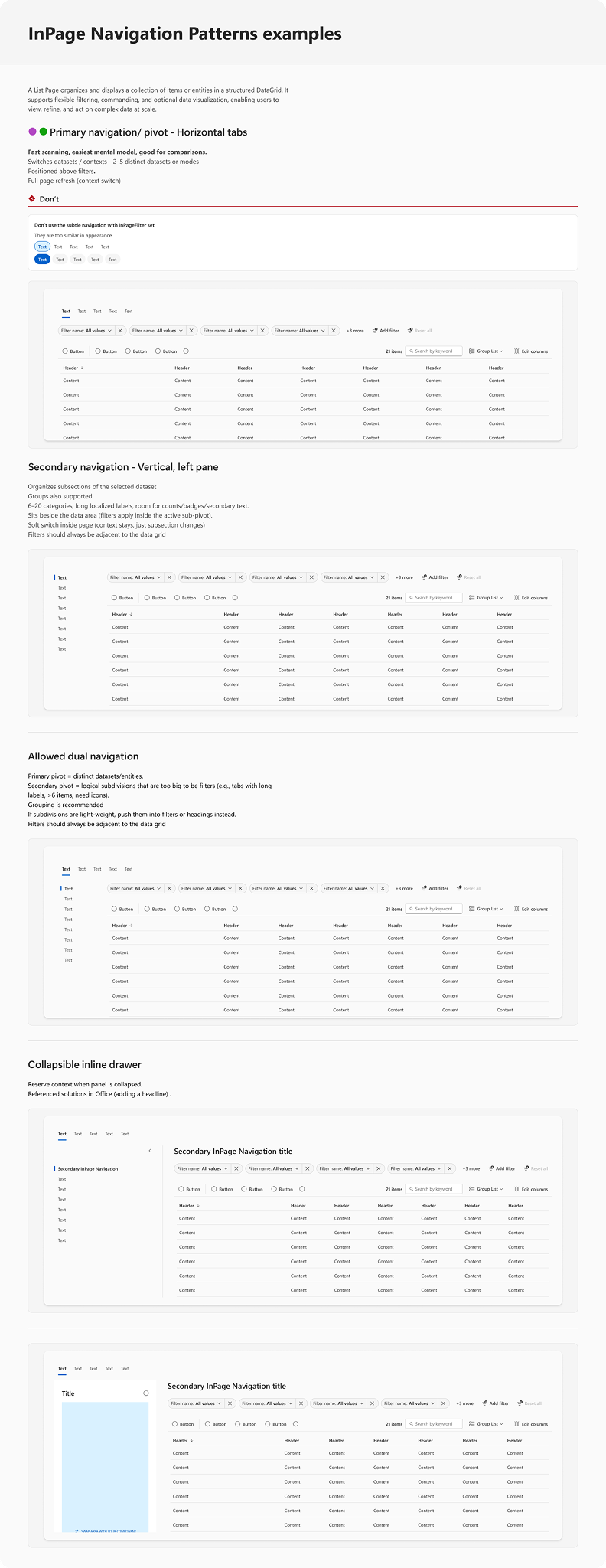
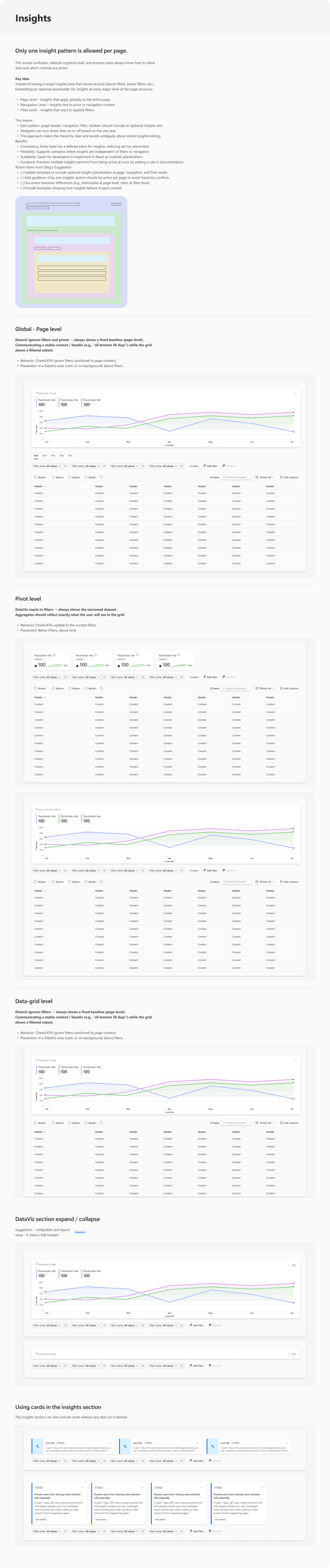
A design system only matters if teams actually adopt it. The connective tissue around the components — the layers that turn a library into something teams reach for by default — is what made it stick.
The operating model. Templates to start, a contribution path to grow, migration to adopt, accessibility to ship inclusively, and support rhythms to keep everyone moving — the system plus everything that makes it stick.
The system didn't stop at components and page templates. It grew into security, Copilot, and AI pattern collections and frameworks — components rebuilt to compose flexible applications, and patterns that now live inside the AI chat canvas itself.
From a component library to an AI-native pattern system. The same foundation now spans reusable components, security & Copilot pattern frameworks, flexible application building blocks, and the AI chat canvas.
Getting many teams onto one system is a people problem as much as a design one. The work stayed close to product, engineering, design, and accessibility partners throughout — earning adoption rather than enforcing it.
| Area | Outcome |
|---|---|
| Coherence | Many teams converged on one security-focused system built on Fluent. |
| Adoption | Templates and a clear contribution path made the system the default starting point. |
| Accessibility | Inclusive patterns moved earlier — built in, not caught late. |
| Design–eng alignment | Fewer gaps between design intent and the components teams shipped. |
| Team focus | Less time re-solving solved problems; more time on product-specific UX. |
Outcomes are described qualitatively; specific metrics are omitted unless approved for external publication.
Product-specific UX needs, turned into a scalable design-system operating model across four Microsoft Security portal pillars — growing from components and templates into security, Copilot, and AI pattern frameworks that now reach all the way into the AI chat canvas.